efctl
efctl is a fast and flexible CLI designed to automate the setup, deployment, and teardown of the EVE Frontier local world contracts and smart gates. Built with Go, it provides an intuitive interface to seamlessly initialize the Sui playground environment and interact with the local blockchain.

Features
- Automated setup — Fetches and prepares the local EVE Frontier environment in seconds.
- Smart Gate lifecycle — Supports
upanddowncommands to gracefully manage container lifecycles. - Builder Flow automation — Includes
extensionandruncommands to quickly initialize, publish, and interact with extensions in the builder-scaffold container. - GraphQL query tools — Interact dynamically with the local Sui GraphQL RPC to query objects and packages.
- Dependency validation — Verifies mandatory local prerequisites (Docker/Podman, Git, Node.js, and open ports).
- Self-updating — Run
efctl updateto download the latest release automatically.
Installation
Below are one-liner installers for each platform. They automatically detect your CPU architecture (amd64 / arm64) and download the correct binary from GitHub Releases.
Tip
Replace latest with a specific tag (e.g. v0.1.0) to pin a version.
Linux
curl
curl -fsSL https://github.com/Scetrov/efctl/releases/latest/download/efctl-linux-$(uname -m | sed 's/x86_64/amd64/;s/aarch64/arm64/') \
  -o /tmp/efctl && chmod +x /tmp/efctl && mkdir -p ~/.local/bin && mv /tmp/efctl ~/.local/bin/efctl
wget
wget -qO /tmp/efctl https://github.com/Scetrov/efctl/releases/latest/download/efctl-linux-$(uname -m | sed 's/x86_64/amd64/;s/aarch64/arm64/') \
  && chmod +x /tmp/efctl && mkdir -p ~/.local/bin && mv /tmp/efctl ~/.local/bin/efctl
macOS
curl -fsSL https://github.com/Scetrov/efctl/releases/latest/download/efctl-darwin-$(uname -m | sed 's/x86_64/amd64/;s/arm64/arm64/') \
  -o /tmp/efctl && chmod +x /tmp/efctl && mkdir -p ~/.local/bin && mv /tmp/efctl ~/.local/bin/efctl
Windows (PowerShell)
& {
  $arch = if ($env:PROCESSOR_ARCHITECTURE -eq "ARM64") { "arm64" } else { "amd64" }
  $url = "https://github.com/Scetrov/efctl/releases/latest/download/efctl-windows-$arch.exe"
  $dest = Join-Path $HOME "bin\scetrov\efctl\efctl.exe"
  New-Item -ItemType Directory -Force -Path (Split-Path $dest) | Out-Null
  Invoke-WebRequest -Uri $url -OutFile $dest
  $userPath = [Environment]::GetEnvironmentVariable("Path", "User")
  if ($userPath -notlike "*$(Split-Path $dest)*") {
    [Environment]::SetEnvironmentVariable("Path", "$userPath;$(Split-Path $dest)", "User")
  }
  Write-Host "efctl installed to $dest — restart your terminal to use it."
}
Note
The Windows installer places efctl.exe in ~/bin/scetrov/efctl and adds it to your user PATH. Restart your terminal for the PATH change to take effect.
From Source
Requires Go 1.25+.
git clone https://github.com/Scetrov/efctl.git
cd efctl
go build -trimpath -ldflags="-s -w" -o efctl main.go
mkdir -p ~/.local/bin && mv efctl ~/.local/bin/
Note
Make sure ~/.local/bin is in your PATH. Add export PATH="$HOME/.local/bin:$PATH" to your shell profile if needed.
Prerequisites
efctl env up checks for the following before starting:
| Requirement | Details |
|---|---|
| Node.js | Version >= 20.0.0 required (24.x recommended) |
| Docker or Podman | Container runtime to run the Sui playground |
| Git | Used to clone the world-contracts repository |
| Port 9000 | Must be free (Sui RPC) |
| Port 8000 | Must be free if using --with-graphql (GraphQL API) |
| Port 5432 | Must be free if using --with-graphql (PostgreSQL) |
| Port 5173 | Must be free if using --with-frontend (Vite dev server) |
Quick Start
mkdir -p ~/ef && cd ~/ef
efctl env up
This single command will:
- Validate all prerequisites
- Clone the world-contracts repository
- Start the Sui playground container
- Deploy the world contracts
- Configure your local Sui client (if installed)
Command Reference
Command Tree
efctl
├── env                              Manage the local dev environment
│   ├── up                           Bring up the environment
│   ├── down                         Tear down the environment
│   ├── dash                         Launch the interactive TUI dashboard
│   ├── shell                        Open a shell in the container
│   ├── extension                    Manage builder-scaffold extensions
│   │   ├── init                     Initialize the extension environment
│   │   └── publish [contract-path]  Publish a custom extension
│   └── run [script-name] [args...]  Run a script in the container
├── graphql                          Interact with Sui GraphQL RPC
│   ├── object [id]                  Query an object by ID
│   └── package [id]                 Query a package and its modules
├── sui                              Sui client utilities
│   └── install                      Install suiup and the Sui client
├── update                           Self-update to the latest version
└── version                          Print version information
Global Flags
| Flag | Description |
|---|---|
-h, --help |
Show help for any command |
efctl env up
Brings up the local environment. Sequentially runs checks, setup, start, and deployment to spin up a fully working EVE Frontier Smart Assembly testing environment.
efctl env up
efctl env up --with-graphql
efctl env up --with-frontend
efctl env up -w /path/to/workspace| Flag | Default | Description |
|---|---|---|
--with-graphql |
false |
Also start the SQL Indexer, PostgreSQL, and GraphQL API |
--with-frontend |
false |
Also start the builder-scaffold web frontend (Vite dev server on port 5173) |
-w, --workspace |
. |
Path to the workspace directory |
After a successful deployment, if the Sui client is installed locally, efctl will configure it to point at the local environment and print suggested test commands.
Tip
If env up fails partway through, run efctl env down before retrying.
efctl env down
Tears down the local environment by stopping and removing all related containers, images, and volumes. Also cleans up the local Sui client configuration.
efctl env down
efctl env down -w /path/to/workspace| Flag | Default | Description |
|---|---|---|
-w, --workspace |
. |
Path to the workspace directory |
efctl env dash
Launches an interactive, responsive terminal dashboard for monitoring the local EVE Frontier development environment in real-time.
efctl env dash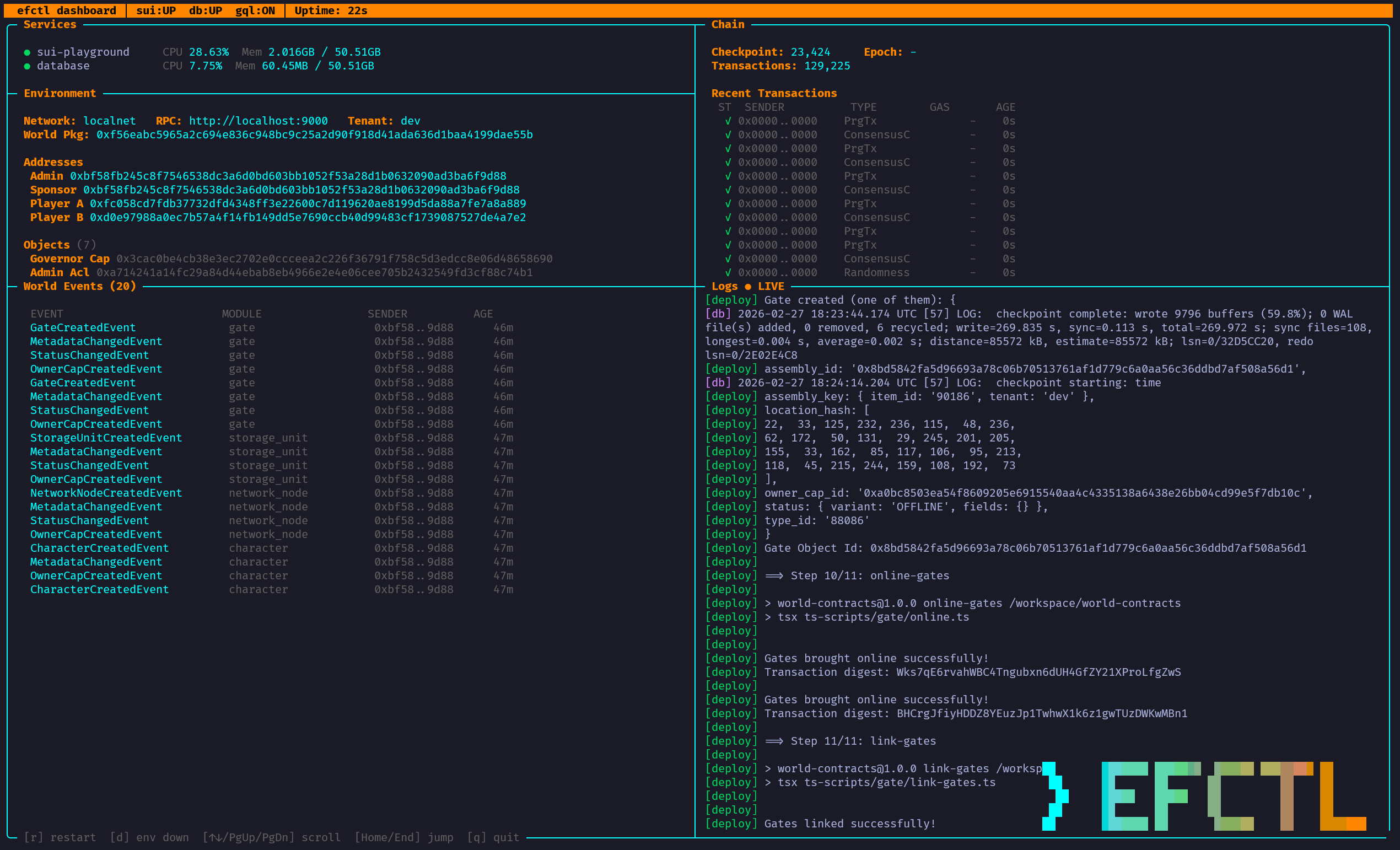
The dashboard displays:
- Services — Container status with live CPU and memory usage for
sui-playgroundanddatabase. - Environment — Network, RPC endpoint, tenant, World Package ID, and key addresses (Admin, Sponsor, Player A, Player B).
- Objects — Deployed world object IDs (Governor Cap, Admin Acl, etc.).
- Chain — Current checkpoint, epoch, and total transaction count.
- Recent Transactions — Live feed of transaction digests with status, type, gas cost, and age.
- World Events — Scrollable list of on-chain events (e.g.
GateCreatedEvent,StorageUnitCreatedEvent) with module, sender, and age. - Logs — Live-streaming container logs with colour-coded output.
The dashboard polls every 2 seconds and supports the following keyboard shortcuts:
| Key | Action |
|---|---|
r |
Restart the environment (down → up) |
d |
Tear down the environment |
↑ / k |
Scroll logs up |
↓ / j |
Scroll logs down |
PgUp / PgDn |
Scroll logs by 20 lines |
Home / End |
Jump to top / bottom of logs |
g |
Enable GraphQL (if not already running) |
f |
Enable frontend dApp (if not already running) |
q |
Quit the dashboard |
efctl env shell
Opens an interactive bash shell inside the running sui-playground container.
efctl env shellThis is useful for running ad-hoc Sui CLI commands or inspecting the container filesystem directly.
efctl env extension init
Initializes the builder-scaffold by copying world artifacts from world-contracts/deployments into the builder-scaffold directory and configuring its .env file. This automates Steps 6 and 7 of the Builder Flow.
efctl env extension init
efctl env extension init -n testnet| Flag | Default | Description |
|---|---|---|
-n, --network |
localnet |
Network to copy artifacts from (localnet or testnet) |
-w, --workspace |
. |
Path to the workspace directory |
efctl env extension publish [contract-path]
Publishes a custom extension contract to the smart assembly environment and updates the builder environment variables. This automates Step 8 of the Builder flow. The [contract-path] must be relative to builder-scaffold/move-contracts.
efctl env extension publish my-extension
efctl env extension publish my-extension -n testnet| Flag | Default | Description |
|---|---|---|
-n, --network |
localnet |
Network to publish to |
The command outputs BUILDER_PACKAGE_ID and EXTENSION_CONFIG_ID on success.
efctl env run [script-name] [args...]
Runs a predefined script (e.g. from package.json) or a custom bash command inside the container in the /workspace/builder-scaffold directory.
# Run a named script via pnpm
efctl env run authorise-gate

# Run an arbitrary command
efctl env run "ls -la"

# Run with extra arguments
efctl env run my-script --flag value
If the script name contains spaces or extra arguments are provided, the command is treated as a raw bash command. Otherwise, it defaults to pnpm <script-name>.
efctl graphql object [id]
Queries a specific on-chain object by its ID/address.
efctl graphql object 0x1234...abcd
efctl graphql object 0x1234...abcd -e https://sui-graphql.example.com/graphql| Flag | Default | Description |
|---|---|---|
-e, --endpoint |
http://localhost:9125/graphql |
Sui GraphQL RPC endpoint |
efctl graphql package [id]
Queries a package by its ID/address and lists its associated Move modules.
efctl graphql package 0xabcd...1234
efctl graphql package 0xabcd...1234 -e https://sui-graphql.example.com/graphql| Flag | Default | Description |
|---|---|---|
-e, --endpoint |
http://localhost:9125/graphql |
Sui GraphQL RPC endpoint |
efctl sui install
Interactively installs suiup and the Sui client. Prompts for confirmation before each step and skips components that are already installed.
efctl sui installefctl update
Downloads the latest efctl binary for your OS and architecture from GitHub Releases and atomically replaces the current executable.
efctl updateNote
This command is not available on Windows. Windows users should re-run the PowerShell installer to update.
efctl version
Prints the version, commit SHA, build date, and platform.
efctl version
# efctl v0.2.0 (a1b2c3d) built 2026-02-15 linux/amd64
Typical Workflows
Setting Up a Local Dev Environment
mkdir -p ~/ef && cd ~/ef
efctl env up                    # Bring up containers + deploy world contracts
efctl env shell                 # (optional) Explore the container
Setting Up with GraphQL
mkdir -p ~/ef && cd ~/ef
efctl env up --with-graphql     # Also starts the GraphQL API + PostgreSQL
efctl graphql object 0x...      # Query objects via GraphQL
Setting Up with Frontend
mkdir -p ~/ef && cd ~/ef
efctl env up --with-frontend    # Also starts the Vite dev server on http://localhost:5173
Building and Publishing an Extension
cd ~/ef
efctl env extension init                        # Step 6-7: Copy artifacts + configure .env
efctl env extension publish my-smart-gate       # Step 8: Publish the contract
efctl env run authorise-gate                    # Step 9: Run the authorise script
Tearing Down
efctl env down # Stop containers, remove images/volumes, clean Sui configSource Code
- Repository: github.com/Scetrov/efctl
- License: MIT